View PDF
The Lifeblood of Modern Communication
3.1.1 Introduction & Importance
- Ubiquity: Email is the most common internet activity (90% of users). Unlike many social media tools, it spans all demographic groups, including older adults.
- The “Mirror” Effect: Analyzing personal email is like looking in a mirror; it reveals actual social hygiene and work relationships, overcoming memory biases.
- Organizational Value: Used to identify internal influencers, “silos” (disconnected groups), and bridge-spanners. It is based on actual behavior rather than often-biased self-reports.
3.1.2 Technical Characteristics of Email
- History: Older than the internet. Ray Tomlinson introduced the ”@” symbol in 1971 to separate user and host.
- Key Features:
- Flexible Form: Supports plain text, rich newsletters, and attachments.
- Asynchronous: No real-time interruption; encourages thoughtful responses.
- Broadcast: Allows ad-hoc grouping and large-scale communication (Listservs).
- Push Technology: Senders determine what arrives in the receiver’s inbox.
- Threaded Conversation: Grouped collections of messages and replies mimic natural turn-taking.
3.1.3 Email Networks
- Vertices (Nodes): Represent unique email addresses or people.
- Edges (Ties): Directed lines representing messages sent from one person to another.
- Weight: Typically based on the total volume of messages exchanged.
- Aggregation: Networks can be “rolled up” to show connections between entire departments or organizational units rather than individuals.
3.1.4 Analytical Questions by Category
| Category | Key Focus Questions |
|---|---|
| Personal | Who are my boundary spanners? Which projects have I neglected? What are my natural subgroups? |
| Organizational | Who are the influencers/experts? How does the “real” communication flow differ from the formal org-chart? |
| Community | Who are the leaders in a public forum? Is the community healthy and growing? |
3.1.5 - 3.1.6 Data Preparation & Cleaning
- Protocols: SMTP (sending), POP/IMAP (retrieving).
- Entity Resolution: The process of matching multiple email addresses (aliases) to a single person. This is a major challenge in email analysis.
- Data Cleaning in NodeXL:
- Remove Aliases: Using Find/Replace or a Lookup table to ensure “john.doe@company.com” and “jdoe@gmail.com” are mapped to the same vertex.
- Merge Duplicate Edges: Rolling up multiple individual messages into a single weighted edge.
- Remove Self-Loops: Deleting instances where people email themselves (unless they represent “reminders” relevant to the study).
3.1.7 Case Study: Personal Email Analysis
- Overview Visualization: A snapshot of a month’s activity. To reduce clutter, analysts often filter out infrequent ties (e.g., edges with a weight < 5).
- Expertise Networks: Created by filtering the corpus for specific keywords (e.g., “NodeXL” or “Research”). This reveals who talks most about a specific topic.
- Common Patterns: “Fan” structures (hubs sending many messages but receiving few) and densely connected cliques (team collaborations).
3.1.8 Case Study: Organizational “Living Org-Charts”
- Normalizing Data: In large companies like “TechABC,” absolute message counts are misleading. Analysts use Messages per FTE (Full-Time Equivalent) to compare small and large units fairly.
- Bridge Spanners: Small units that link large, separate divisions are critical; they are often vulnerable to employee turnover.
- Research Division Example: Analysis showed that while many research units exist, they are often disconnected from one another, suggesting a lack of interdisciplinary collaboration.
3.1.9 Case Study: Historical/Legal (Enron)
- The Dataset: ~500,000 emails made public after the Enron investigation.
- Content Networks: Using keywords like “FERC” (Federal Energy Regulatory Commission) to find relevant clusters.
- Identifying Key Players: High In-Degree (receiving many messages) can signal a central “go-to” person or, in legal contexts, a mastermind.
- Finding Violators: In the Enron data, Tim Belden (a key witness/conspirator) was identified by his unique position in the “FERC” communication network.
3.1.10 - 3.1.11 Practitioner & Researcher Agenda
- Ethics: Monitoring email is legally permissible for most companies but requires transparency to avoid “Big Brother” perceptions.
- Future Research: * Forensic Tools: Improving how we find documents in massive archives.
- Temporal Changes: Detecting sharp increases/decreases in communication that signal major events (rumors, reorganizations, or crises).
- Geo-location: Tying email to physical office positions to understand social flow.
Mapping Message Boards and Email Lists
3.2.1 Introduction
- Core Function: Threaded conversations are the primary communication channel for virtual communities (email lists, web boards, Usenet).
- Versatility: They serve diverse groups—from medical support to corporate workgroups.
- Network Suitability: The “post-and-reply” structure is ideal for network analysis because every reply creates a directed link between individuals.
- Modern Integration: Threaded conversations are now embedded in platforms like Facebook, YouTube, and Flickr.
3.2.2 Definition and Key Properties
Threaded conversation is a design theme using a post-reply-reply structure. Key characteristics include:
- Topics: Hierarchically organized, persistent spaces (e.g., “Social Media,” “NodeXL”).
- Threads: A top-level message plus the entire tree of responses.
- Single Authored: Each message is created by one user.
- Permanence: Posts usually cannot be edited or retracted (though newer systems like Google Wave/Google Docs changed this).
- Homogeneous View: All users see the same chronological or reverse-chronological order.
- Push vs. Pull: Email lists “push” content to users; forums require users to “pull” (visit the site).
3.2.3 Analytical Questions
- Individuals: Who are the experts, answer-people, and discussion-starters? Who can replace an outgoing administrator?
- Groups: Who is the “core” vs. “periphery”? What subgroups exist?
- Temporal: How do participation patterns change over time? How does a member transition from “newbie” to “expert”?
- Structural: What roles reoccur? Is the community sustainable?
3.2.4 Threaded Conversation Networks
There are three main ways to map these interactions:
-
Reply Network:
- Mechanism: A directed link from the person replying to the specific person they are answering.
- Utility: Captures the true conversational flow.
-
Top-Level Reply Network:
- Mechanism: Connects all repliers directly to the person who started the thread.
- Utility: Emphasizes thread-starters; useful for Q&A communities where most answers are directed at the original asker.
-
Bimodal (Affiliation) Network:
- Mechanism: Connects users (Mode 1) to specific threads or forums (Mode 2).
- Utility: Identifies “boundary spanners” who participate in multiple distinct topics.
3.2.5 Case Study: Technical Support (CSS-D)
Technical support lists like CSS-D (Cascading Style Sheets) are often analyzed to find high-value contributors.
Identifying Social Roles
Social Network Analysis (SNA) identifies roles better than simple post counts:
- Answer People: * High Out-Degree (they reply to many people).
- Low Clustering Coefficient (the people they help usually don’t know each other).
- They act as “hubs” for information.
- Question People:
- Low Degree.
- High Average Degree of Neighbors (they are connected to experts/answer-people).
- Discussion Starters:
- High In-Degree (they get many replies).
- High Clustering Coefficient (the people replying to them often talk to each other).
The “Answer Person” Score
Analysts create composite metrics to find these users automatically:
- Formula Example: (Percent Out-Degree) × (Clustering Coefficient Inverse).
- Strategic Value: Identifying these users helps managers know who to thank and protect from burnout.
3.2.6 Case Study: Finding a New Administrator (ABC-D)
When an administrator leaves, SNA can find a replacement based on their position in the network:
- Key Metric: Betweenness Centrality. Candidates with high betweenness already act as bridges between different clusters of the community.
- The “What-If” Analysis: By manually removing the current administrator from the graph (using “Skip”) and recalculating metrics, managers can see whose influence increases and who might naturally step into the role.
3.2.7 Case Study: Ravelry Groups
Ravelry (a yarn/knitting community) illustrates the use of Bimodal Networks:
- Connection: Links users to the forums they post in.
- Insights: Shows that location-based groups (e.g., “Chicago Fiber Arts”) have different patterns than project-based groups.
- Boundary Spanners: Users connected to multiple blue text boxes (forums) are identified as the connectors of the wider community.
3.2.8 - 3.2.9 Practitioner and Researcher Summary
- Practitioners: SNA provides a “forest view” of massive conversation archives, revealing social structures that participation statistics alone miss.
- Researchers: Future study is needed on the “right mix” of roles (how many answer-people are needed to sustain a community?) and the impact of combining threaded conversations with other tools like wikis.
Study Tip: For the exam, be able to differentiate between Answer People (High Out-Degree/Low Clustering) and Discussion Starters (High In-Degree/High Clustering). This is a frequent technical question in SNA.
Conversation, Entertainment, and Information
3.3.1 Introduction: The Rise of the Microblog
- Simplicity as Strategy: Twitter’s success stems from its “brass-tacks” construction: a stream of short messages and an empty box.
- Cultural Impact: Used for political campaigns, fan engagement, and real-time coordination during natural disasters (hurricanes, wildfires) or political turmoil (Iran 2009).
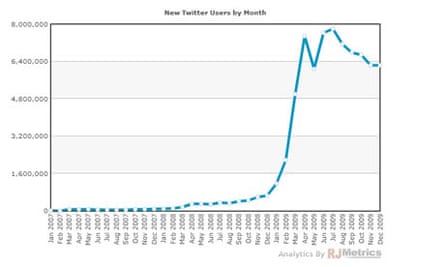
- Growth Milestones: * SXSW 2007: Initial “tech-savvy” buzz.
- The “Oprah” Effect (2009): Mainstream adoption driven by celebrities like Shaquille O’Neal, Ashton Kutcher, and Oprah Winfrey.
- Ecosystem: Beyond the web interface, third-party clients like TweetDeck and Twhirl allow for specialized views (columns, search queries).
3.3.2 The Nuts and Bolts
Twitter is a conversational microblog where users post “tweets” limited to 140 characters (originally for SMS compatibility).
Key Terminology
- Followers: People who subscribe to your messages.
- Friends: People whom you follow.
- @replies & @mentions:
- @reply: A tweet starting with a username (e.g.,
@redlog). A “marker of addressivity” that keeps conversations coherent in a noisy environment. - @mention: Including a name within a tweet but not at the start.
- Symmetry: While following is often asymmetric (celebrities have fans but don’t follow back), the exchange of @replies creates a symmetric connection, indicating a stronger social tie.
- @reply: A tweet starting with a username (e.g.,
- #hashtags: * Community-driven descriptive keywords.
- Used for events (#chi2010), news (#mumbai), or games (#robotpickuplines).
- Retweeting (RT): * Rebroadcasting someone else’s tweet with attribution.
- Functions as validation (I like this) and amplification (I want my followers to see this).
3.3.3 Networks in Twitter: Attention vs. Information
The “Friends/Followers” network is actually two distinct networks overlaying the same people:
- Attention Network: Follower ties show where attention flows (e.g., from a fan to a celebrity).
- Information Network: The reverse direction; shows where information flows (from the tweeter to the followers).
Centrality Metrics in Twitter
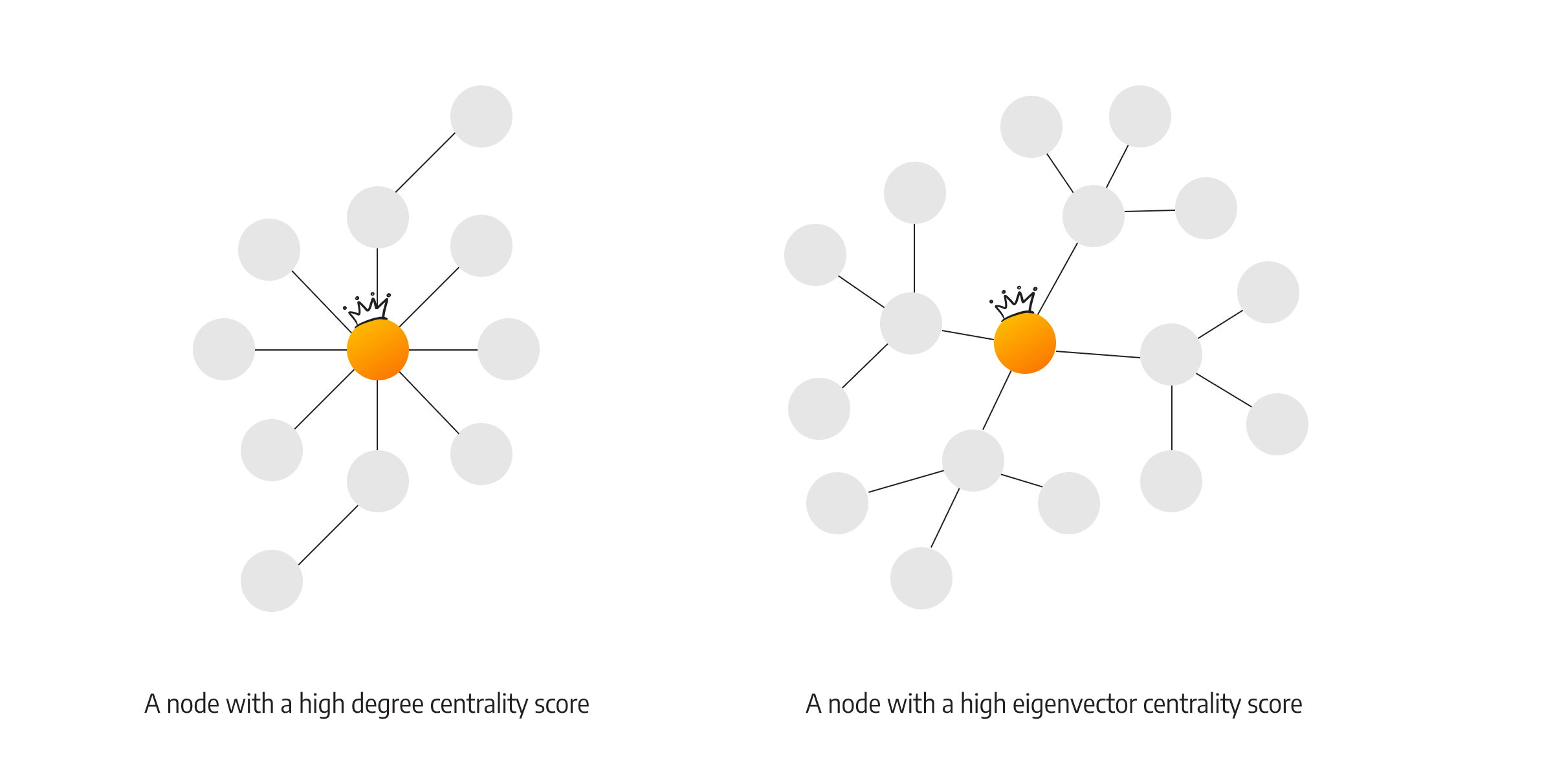
- Eigenvector Centrality (Importance): Measures influence. You are important if you are followed by other “important” people (similar to Google’s PageRank).
- Practical Use: Identifying spammers who may have many followers, but whose followers are unimportant/fake.
- Betweenness Centrality (Brokerage): Measures access to non-redundant information.
- The “Bridge”: An actor who connects two otherwise unconnected clusters. High betweenness actors are “information brokers” who see diverse content first.
3.3.4 Acquiring Data & Limitations
- NodeXL Options: “From Twitter User’s Network” (Ego-centric) or “From Twitter Search Network” (Topic-centric).
- Rate Limits: Twitter restricts standard accounts to 150 requests per hour. Whitelisting can increase this to 20,000/hour.
- Speed: Data collection is slow (10–30 seconds per user). Mapping a network of 1,000 users can take hours.
3.3.5 Discovery with NodeXL
3.3.5.1 The Ego Network
- Ego: The focal user. Alters: The user’s friends and followers.
- Strong Ties vs. Weak Ties:
- Reciprocal Ties: (You follow me, I follow you) usually indicate close friends or colleagues.
- Closed Triads: If two of your friends know each other, it forms a “closed triad,” suggesting a tight, cohesive community.
- Cluster Detection: Using NodeXL’s “Find Clusters” can automatically separate your Twitter alters into real-world groups (e.g., “Family” vs. “Work Colleagues”).
3.3.5.2 Trending Topics (Information Diffusion)
- Diffusion Patterns:
- Star Pattern: One user’s tweet is retweeted by many followers (highly influential “seed”).
- Grid Pattern: Users only mention a topic after seeing it from multiple sources (social influence/redundancy is key).
- Case Study: #BlackFriday:
- Analysis reveals “seeds”—specialized accounts that may have few followers but are highly effective at getting their messages retweeted by larger, more active accounts.
3.3.6 Practitioner’s Summary
- Strategy is Key: Whether for personal branding or business, you must identify the network structure.
- Starlike networks prioritize the center; Cohesive networks prioritize the group.
- Identify “seeds” (influential promoters) to maximize information spread for free.
3.3.7 Researcher’s Agenda
- Micro-level: Studying individual features like retweets and @replies.
- Macro-level: Mapping memes, idea spread, and organizational connections across institutional boundaries.
- Challenge: Obtaining and visualizing the “minute details” of human conversation as networks change over time.